 |
 |
|
|
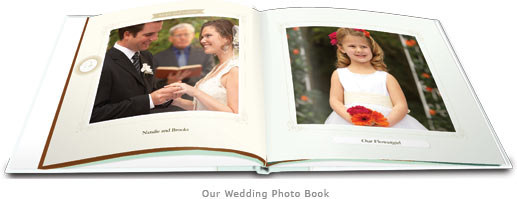
We know how important your wedding memories are to you, and Martha Stewart has designed a unique photo book to elegantly and effortlessly help you preserve them. Our Wedding uses your favorite photos and meaningful text to tell the story of your special day. |
|
||
 | |||
Getting Started: |
|||
 |
|||
The flexible design of Our Wedding Photo Book allows for the pages to be organized in any order. You can use the book to narrate the special day (the default layout) or to tell a longer story from the moment you met through the honeymoon (adding additional alternative pages). The book’s pages can be arranged in any order you want. Be sure to add as many of these pages as you desire to suit your needs. For example, if you have lots of candid shots from the reception, use more of the multi-photo pages. Select pages that showcase one or two large photos for your formal portraits. You can combine traditional and celebratory images by contrasting one larger black and white photo with another page of multiple color images. Note: This photo book was designed with a specific pre-set font and font size. Use the zoom tool to preview how your text looks using this font and we think you’ll be pleased. |
|
||
 |
|||
Photo Tips: |
|||
 |
|||
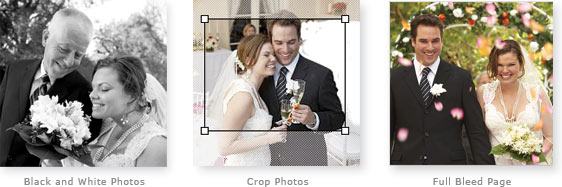
To make the creation process go smoothly, it’s important to gather all the photos before you begin. Remember to ask your photographer to send you the digital photo files from your wedding in order to have all of your photos at hand before you start. To save you time, he or she may also upload the files to Shutterfly directly. Mix in black and white photos to give portraits a timeless feel. If you only have color pictures or want to change a photo, you can edit any photo to black and white or sepia tone when making your photo book. You can also crop photos using Shutterfly’s online tools. To focus on a moment, crop in tightly on a simple shot without a lot of clutter. Pages with room for many small photos are great for candid snapshots taken by guests at the wedding. For a dramatic effect, use a single image on a full-bleed-photo page. This is perfect for highlighting a very special photo or for scanning in your wedding invitation. |
|
||
|
|||
Tips for Specific Pages: |
|||
 |
|||
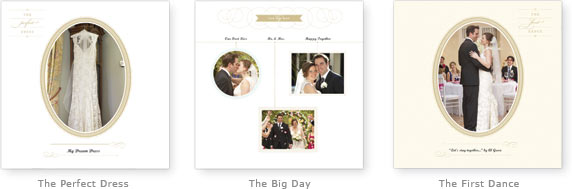
Many of the pages in the Our Wedding photo book have been designed with fixed sentiments to illustrate and explain the story of your big day. We’ve gone through some of these pages to help you think about what photos are the best fit for these layouts. For the cover, a landscape layout is the default option, but by going into Backgrounds, you can also choose a portrait layout for your wedding album. The all-text pages are a place to include your vows, the story of your wedding, a passage from a speech or poem that was read during the ceremony, or the best man’s toast. The all-text page with a large photo is ideal for a dedication at the end of Our Wedding Photo Book. The first Family and Friends page is a great place to paint a portrait of your families. Are there cherished friends or pets you consider part of the family? Remember: if you need more places to insert photos, you can always add a duplicate of this or any other page. In addition to featuring portraits in The Perfect Dress page, include photos of shopping for the dress, the flower girls’ or bridesmaids’ dresses, or shots of a second dress worn during the reception. Detail photos are lovely here: the lace and embroidery, the veil and shoes, and the engagement and ring against the dress. Your wedding is as unique as you are. The Big Day pages are a way to showcase both the traditions we cherish and the details that made your wedding day special. To complement the formal portraits of the celebrated moments, add in snapshots of flower-adorned pews at the church or the customized matchbooks at the reception. Don’t forget to add the approximate time of each event to get a sense of how the day unfolded. For What Made Us Laugh and What Made Us Cry, recall a key moment and build on it. Was there a funny story that made you blush during the toast? Did you get any advice from your parents? Let your friends and family know through your captions in the text boxes. Whether it’s two words or a paragraph, words enhance the meaning and complement the pictures you select. Past and Present is a place to honor the past. Has your engagement ring been passed down through the generations? Are there photos of you catching the bouquet at your sister’s wedding? Scan in photos of parents’ or other close family members’ weddings to give the book an heirloom feel. For The First Dance, remember to include the name of the song you chose and its significance. Photos of people watching the first dance or dancing themselves work beautifully here. |
|
||
|
|||
Resize Your Book: |
|||
 |
|||
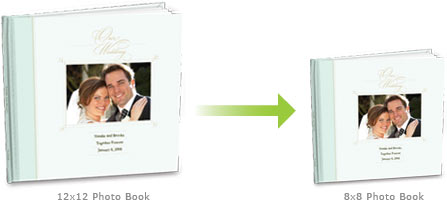
Many people choose to create their Our Wedding photo book in the larger 12”x12” size as a stunning keepsake album. You also have the option of creating additional versions in the smaller 8”x8” size, which make a perfect gift for family or friends. Whatever size you start with, the book can easily be resized up or down, without creating a whole new book. |
|
||
|
|||
 |
|||
If you’re looking for inspiration from other brides, browse the other wedding books that have been shared to the Shutterfly Gallery. And, when you’re done, share your finished book to inspire others. |
|
||