Go to the Shutterfly home page.


Jump to:

Get Your Photo Books in Time for the Holidays

shutterfly holiday expedited shipping details

Want to make sure your photo book arrives in time for Christmas? Don’t wait—plan ahead and choose the shipping speed that works for you. Here are Shutterfly’s holiday order-by dates to help you get your gifts delivered on time:

International Orders:

Planning ahead means you can relax knowing your personalized photo books will arrive just in time to share memories and holiday cheer.

Types of Photo Book Deals

Shutterfly makes sure you can take advantage of the best photo book deals, whether you’re looking for free shipping, more pages, discounts on large orders, and more. With our various sales and promo codes throughout the year, you can choose any of our photo book styles and sizes and still make sure it fits your budget.

anniversary photo books

Get the best price on your personalized photo books when you shop using Shutterfly’s promo codes, special offers, and incredible deals. From free extra pages to hefty discounts on layflat albums, Shutterfly offers several types of deals on photo books. Here are some examples of the promotions you can find on the Shutterfly app and website:

Find Photo Book Deals Directly on the Site

Head to the Shutterfly homepage to discover current photo book coupons, deals, and offers. You’ll often find perks like free economy shipping, free upgrades to expedited shipping, and discounts on other personalized products like wall art and greeting cards. Don’t forget to enter your coupon codes at checkout to get the best price on your photo albums.

Promo codes update frequently, so check back often or bookmark the Special Offers pages to stay on top of the latest discounts.

year in review photo books

Sign up and Save

The easiest way to snag photo book promo codes is by signing up for Shutterfly’s newsletter and creating an account. You’ll get weekly emails with upcoming sales, exclusive offers, and sneak peeks of new products. Plus, by adding your home address, you can receive extra discounts through the mail.

Stack Shutterfly Coupon Codes for More Photo Book Deals

Shutterfly lets you stack multiple coupon codes on one order to maximize your savings. While some free shipping offers may not combine with others, it’s worth trying different combinations at checkout to see what works best.

Adding the best promo codes to your account is easy. Follow these steps:

  1. Log in to or sign up to create your account.
  2. Click on “My Account” at the top of the page.
  3. Click on “My account info” in the My Orders & Account Info box.
  4. Enter your promo codes in the provided box.

Need a hand? Let our designers make it for you. Save time and enjoy a beautifully crafted album you'll treasure forever. Learn More.

Create Photo Books Ahead of Time for the Best Offers

Building a perfect photo book takes time—start your project early and save it as you go. Promo codes are released throughout the month and last several days, so having your project ready means you can jump on the best deals without rushing. If your timeline allows, watch for seasonal sales for the deepest discounts.

Follow Shutterfly on Social Media for Exclusive Deals

Stay connected on Facebook and Instagram for exclusive photo book sales, special offers, and the latest product news. Following Shutterfly’s social channels is an easy way to catch deals you won’t want to miss.

Find Discounts on More Than Just Photo Books

Shutterfly offers savings on a wide range of products beyond photo books—including cards, home décor, photo prints, personalized gifts, and wall art like canvas prints and photo tiles. Keep an eye out for sitewide deals during major shopping events like Black Friday and Cyber Monday.

The Shutterfly mobile app is another great resource for freebies, discount codes, and free shipping offers—you can even order unlimited free prints through the app. Make sure to create an account to get early access to the best deals.

Related Resources

From holiday celebrations to travel adventures, make your memories last a lifetime in a beautiful and timeless photo book. Whether you’re creating an album for a loved one or for yourself, with Shutterfly, there’s always a way to save with the best photo book promo codes, coupons, amazing deals, and special offers.

Additional Resources:

The post How to Get the Best Shutterfly Photo Book Deals appeared first on Ideas & Inspiration.


How to Get the Best Shutterfly Photo Book Deals was first posted on December 15, 2025 at 1:00 pm.
©2016 "". Use of this feed is for personal non-commercial use only. If you are not reading this article in your feed reader, then the site is guilty of copyright infringement. Please contact me at iops-dco@shutterfly.com
]]> https://www.shutterfly.com/ideas/how-to-get-the-best-shutterfly-photo-book-deals/feed/ 0 How to Make a High-Quality Wedding Photo Album https://www.shutterfly.com/ideas/make-your-own-wedding-album/ Fri, 30 May 2025 20:00:37 +0000 https://shutterflywpe.wpengine.com/?p=6709 Create a stunning wedding photo album with our step-by-step guide. Discover tips, design ideas, and inspiration for preserving your big day in a beautiful keepsake.

The post How to Make a High-Quality Wedding Photo Album appeared first on Ideas & Inspiration.


How to Make a High-Quality Wedding Photo Album was first posted on May 30, 2025 at 1:00 pm.
©2016 "". Use of this feed is for personal non-commercial use only. If you are not reading this article in your feed reader, then the site is guilty of copyright infringement. Please contact me at iops-dco@shutterfly.com
]]>
Creating a wedding photo album is a timeless way to relive your special day. Whether you want to capture the elegance of the ceremony, the joy of the reception, or the candid moments in between, a well-designed album tells your story beautifully. This guide will walk you through the essential steps to make a wedding photo book that not only preserves your memories but also reflects your unique style. From selecting the perfect theme to adding personal touches, here’s everything you need to create a stunning keepsake.

1. Pick a Wedding Album Theme

Choosing a theme for your wedding photo album is the first step in creating a cohesive, beautiful keepsake. Your theme will guide the colors, layout, and style of your album. It should match the overall aesthetic of your wedding and the vibe you want to capture.

Luckily, our templates come in a variety of styles to fit any type of wedding. Whether you had a romantic, vintage-inspired ceremony or a modern, minimalist celebration, there’s a template that fits your vision. Consider these options:

  • Classic: A timeless, elegant design with clean lines and traditional layouts.
  • Rustic: A warm, earthy feel, often featuring wooden textures and floral accents.
  • Modern: Sleek and minimalistic with bold fonts and clean spacing.
  • Bohemian: Free-spirited and whimsical with bright colors and artistic layouts.

Pick a photo book theme that resonates with you and reflects the mood you want to evoke every time you flip through the album.

2. Decide How You Want it Structured

Before you start adding photos, it’s important to decide how you want your album to flow. Think of it as telling a story — you’ll want to organize the images in a way that makes sense and flows naturally.

Here are some common ways to structure a wedding album:

  • Chronologically: Start with getting ready shots, move through the ceremony, reception, and finish with candid moments or the grand exit.
  • Thematically: Group photos into sections based on themes like “The Bride & Groom,” “The Ceremony,” “The Reception,” and “Family & Friends.”
  • Aesthetic/Design-Based: If you have a lot of artistic or styled shots, you might group them by colors or design elements.

Once you’ve chosen a structure, you can move on to making an outline.

3. Make an Outline

woman flipping through a wedding photo album

Before selecting photos, it’s crucial to decide on the overall layout of your wedding album. Think of this as creating a blueprint for your book — how you want to tell the story from start to finish.

A good outline will not only help you visualize the flow of the album but also guide you in selecting the right photos to match each section.

Here’s how to break it down:

  • Opening Spread: Set the tone for your album with a captivating introduction. Consider starting with a photo of your venue, a candid shot of the couple, or a family portrait.
  • Getting Ready: Dedicate a few pages to capture the moments before the ceremony. This is a great opportunity for shots of the bride’s dress, the groom’s preparations, and any meaningful details like jewelry or heirlooms.
  • The Venue & Ceremony: Follow up with wide shots of the ceremony space and the key moments of the ceremony itself — walking down the aisle, exchanging vows, the first kiss, and reactions from guests.
  • Couple Portraits: After the ceremony, focus on capturing intimate portraits of the newlyweds. Think about a mix of candid and posed shots that showcase your love and personalities.
  • The Reception: Include lively shots of your reception, such as the first dance, speeches, and candid moments with friends and family.
  • Family & Guests: Don’t forget to document the people who made your day unforgettable! Include photos of the wedding party, family group shots, and shots of guests mingling.
  • Closing Moments: End with a memorable closing shot — perhaps the couple’s farewell, a final group photo, or an emotional moment shared between the couple.

By establishing this outline early on, you’ll have a better sense of which photos you need to capture and how they should be arranged in the album to tell a cohesive, well-paced story.

4. Pick Your Photos: Select the Best Shots for Your Story

wedding album with pictures of family

Once your album structure is in place, it’s time to sift through the sea of wedding day photos to choose the ones that truly tell your story. This step requires a discerning eye, as you’ll want to focus on the moments that matter most, along with shots that bring the overall album to life.

Here’s how to approach your photo selection:

  • Must-Have Wedding Shots: Start by selecting essential images — the ones that capture the pivotal moments of the day. These include:
    • Pre-Ceremony: The bride and groom getting ready, the bride’s dress, wedding accessories, and behind-the-scenes moments.
    • The Ceremony: Candid shots of the couple exchanging vows, the kiss, reactions from family and friends, and the venue.
    • Couple Portraits: A mix of posed and candid portraits, showing you as a couple in various settings (e.g., outdoor portraits, intimate close-ups).
    • Reception & Party: Photos of guests enjoying the reception, the first dance, cake cutting, and spontaneous moments of fun.
  • Key Guest Shots: While you’ll want a few formal family portraits, also consider including candid shots of guests enjoying the event. Focus on the smiles, laughter, and emotional moments that will make the album feel personal and vibrant.
  • Details Matter: Don’t forget about the little things that bring the day together — flowers, rings, wedding favors, décor, and any sentimental keepsakes or notes exchanged.
  • Quality Over Quantity: It’s easy to get carried away when choosing photos, but remember that your album should tell a story. Select only the best versions of each moment — avoid repeating similar photos or shots that don’t add something new to the story.
  • Candid vs. Posed: Aim for a balance of posed portraits and natural, candid moments. While portraits are important, candid photos capture real emotions and unplanned moments, adding authenticity to the album.

By thoughtfully selecting each photo, you ensure that your wedding album isn’t just a collection of images, but a curated visual story that reflects the depth and emotions of your day.

5. Select a Cover Photo

just married cover of wedding photo book

The cover photo is the first thing people will see, so make it count. It should be an image that’s both meaningful and visually striking. Consider these tips when selecting your cover photo:

  • Close-Up: A close-up of the couple — either a kiss, a hug, or a sweet moment.
  • Scenic Shot: A wide-angle image of the venue or an outdoor ceremony shot.
  • Timeless: Avoid overly trendy or specific moments and opt for a timeless image that will still feel meaningful years later.
  • High-Quality: Ensure the photo you select is high resolution for the best print quality.

Your cover sets the tone for the entire album, so choose wisely.

6. Customize the Page Layouts

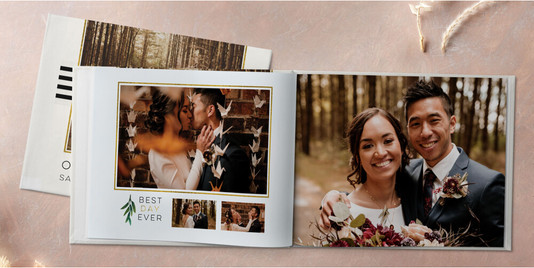
wedding photo book

Choosing layouts and spreads can feel like an overwhelming task, but there are simple guidelines to follow. Most wedding albums offer a variety of layout options, from single photo pages to multi-photo collages.

Here are a few tips for selecting layouts:

  • One Photo per Page: Ideal for your most emotional or stunning shots, such as your first kiss or portraits.
  • Multiple Photos per Spread: Great for candid shots, family photos, and reception moments.
  • Mix It Up: A combination of layouts keeps the album visually dynamic and engaging.

Consider the type of moments you’re trying to showcase — larger, more dramatic shots deserve a single page, while smaller, candid moments can be grouped into a collage.

7. Include Titles and Captions

wedding photo book

Titles and captions are an important detail that can help tell the story behind each photo. While your album is primarily visual, adding a few words of context can enhance the emotional connection.

For example, consider adding:

  • Captions: Describe the emotion, location, or meaning of each shot (e.g., “Our first dance as husband and wife”).
  • Titles: Introduce each section (e.g., “The Ceremony,” “The Reception”).

But don’t overdo it — a little goes a long way, and simple captions often work best.

8. What Else to Include

To make your wedding album even more meaningful, consider adding printed keepsakes that capture the emotion and personality of your big day. These details can help tell the full story and bring back the little moments you might otherwise forget.

Here are some ideas:

  • Wedding Invitation Suite: Include a scan or photo of your save the date, wedding invitation, RSVP card, or wedding thank you card. These set the tone for your event and serve as a beautiful visual introduction.
  • Handwritten Vows or Letters: If you and your partner exchanged vows, notes, or letters, include scans or typed excerpts for a deeply personal touch.
  • Ceremony Program: A copy of your ceremony program can highlight the order of events, special readings, and the names of your wedding party.
  • Menus or Place Cards: Capture the details of your reception by including personalized elements like dinner menus or escort cards.
  • Pressed Flowers: Some couples scan or photograph pressed petals from their bouquet or floral arrangements for a subtle, romantic detail.
  • Wedding Day Timeline or Itinerary: If you had a printed schedule or wedding timeline for your bridal party or guests, this can be a fun artifact to remember the structure of your day.
  • Custom Illustrations or Maps: Many couples include a custom venue map or illustration from their invitations — these are perfect visual fillers between spreads.
  • Other Memorabilia: Items like photo booth strips, dried petals, or even a wedding hashtag sign can bring personality and texture to your album.

9. Review Before You Finalize

Before you hit “publish” or “order” on your wedding album, take the time to review every detail. Make sure that:

  • Photos are correctly placed and in the right order.
  • Captions and titles are spelled correctly.
  • There are no missing pages or sections.
  • The layout flows naturally.

A fresh set of eyes can be helpful, so consider having a friend or family member give it a quick look before you finalize it.

10. Pick Extra High-Quality Features

leather cover gilded pages wedding photo book

Once you’ve finalized the layout and content of your wedding photo album, take it to the next level with premium features that elevate its look, feel, and longevity. These finishing touches not only enhance the aesthetic but also preserve your memories for years to come.

Premium Covers & Bindings

  • Premium Leather Cover: A luxurious upgrade perfect for your main wedding album.
  • Deluxe Layflat: Thicker, premium-quality pages with a professional feel.
  • Flush Mount: Ultra-thick, board-mounted pages with elevated extras like gilded edges or rounded corners — ideal for heirloom albums.

Luxury Add-ons & Extras

  • Glossy Pages: Enhance image sharpness and vibrancy with a glossy finish.
  • Metallic Accents: Highlight names, dates, or titles with shimmering foil touches.
  • Gilded Page Edges & Rounded Corners (Flush Mount only): Elegant upgrades that add polish and refinement.
  • Gift Boxes: Store your album in a protective keepsake box for added presentation.
  • Memorabilia Pockets: Tuck in small mementos like extra photos, pressed flowers, or notes.

These premium options turn your wedding album into a lasting work of art — worthy of your most treasured memories.

Related Resources on Wedding Photo Albums

Your wedding album is more than just a collection of photos — it’s a storybook of one of the most important days of your life. With thoughtful planning, meaningful details, and high-quality finishing touches, you can create an album that captures the emotion, energy, and beauty of your celebration. Take your time selecting the right photos, designing each layout, and choosing the features that reflect your style. In the end, you’ll have a keepsake you’ll be proud to flip through for decades to come — and share with generations to follow.

Additional Resources:

The post How to Make a High-Quality Wedding Photo Album appeared first on Ideas & Inspiration.


How to Make a High-Quality Wedding Photo Album was first posted on May 30, 2025 at 1:00 pm.
©2016 "". Use of this feed is for personal non-commercial use only. If you are not reading this article in your feed reader, then the site is guilty of copyright infringement. Please contact me at iops-dco@shutterfly.com
]]>
Standard Photo Book Sizes for Any Occasion https://www.shutterfly.com/ideas/photo-album-sizes/ Thu, 13 Mar 2025 22:00:42 +0000 https://shutterflywpe.wpengine.com/?p=48828 Your ultimate guide to finding the right photo book size to hold your most valued memories. Use these tips to design your best photo album.

The post Standard Photo Book Sizes for Any Occasion appeared first on Ideas & Inspiration.


Standard Photo Book Sizes for Any Occasion was first posted on March 13, 2025 at 3:00 pm.
©2016 "". Use of this feed is for personal non-commercial use only. If you are not reading this article in your feed reader, then the site is guilty of copyright infringement. Please contact me at iops-dco@shutterfly.com
]]>


Popular Photo Book Sizes

When it comes to creating a personalized photo book with Shutterfly, picking the right size is essential. Your choice will depend on the occasion, the number of photos you want to include, and how you envision displaying them. Whether you’re creating a compact keepsake or a large coffee table book, Shutterfly offers various sizes that cater to every need. Below, we’ll explore each of the most popular sizes, breaking down how they work best with different photo collections and layouts to help guide your decision.

8×8 Photo Book 

8x8 photo book

Orientation: Square

This compact size is perfect for personal projects, quick highlights, or gift albums. Its versatility in handling both vertical and horizontal images makes it ideal for collections that mix different photo orientations, from Instagram shots to family moments.

8×11 Photo Book 

8x11 photo book

Orientation: Portrait

For a traditional feel, this portrait size works wonderfully for documenting milestones or professional events. Its vertical layout frames formal photos beautifully, giving them an elegant presentation. This book is great for portfolios or showcasing classic photography.

10×10 Photo Book

10x10 photo book

Orientation: Square

Similar to the 8×8 book but slightly larger, this square option provides extra space for bigger, bolder layouts. Use it for celebrations like weddings or baby showers, where you want to add a few more visual details and allow the images to shine.

11×14 Photo Book

girls trip travel photo book

Orientation: Landscape

This large, vertical book adds a formal and dramatic touch to your photo collections. It’s a great choice for weddings or portfolios where you want your images to be front and center, framed in a classic way.

12×12 Photo Book

12x12 photo book

Orientation: Square

If you’re looking for a show-stopping, bold coffee table book, this 12×12 photo book is the way to go. It offers a premium experience with space for large photos, making it perfect for showcasing professional photography or commemorating life’s biggest moments.

Photo Book Size Chart

Here’s a breakdown of Shutterfly’s available photo album sizes:

Album Size (inches) Orientation Album Size (cm) Best For
8×8 Square 20.32 x 20.32 Compact albums, everyday moments, Instagram photo books
8×11 Portrait 20.32 x 27.94 Family albums, yearbooks, children’s art books
10×10 Square 25.4 x 25.4 Wedding albums, baby books, special occasions
11×8 Landscape 27.94 x 20.32 Travel albums, wide panoramic photos, scenic photography
11×14 Portrait 27.94 x 35.56 Professional photography books, event albums
12×12 Square 30.48 x 30.48 High-impact displays, coffee table books, portfolio albums

Different Photo Book Orientations

all the different photo book sizes

When creating your custom photo book with Shutterfly, you can choose from three different orientations: square, landscape, and portrait. Each orientation offers a unique way to showcase your photos, depending on the layout and style you prefer.

Square Photo Books

Square photo books (like the 8×8 and 12×12 sizes) provide a balanced, symmetrical layout. They work well for both horizontal and vertical images, making them versatile for any type of photo. Square books are great for Instagram collections, weddings, and baby albums since they offer a modern, clean look. The uniformity of the design gives your photo book a cohesive feel and allows you to mix various photo styles without any awkward cropping.

Landscape Photo Books

Landscape-oriented books (like the 11×8 size) are wider than they are tall. This orientation is perfect for panoramic or wide photos, especially when capturing landscapes, travel adventures, or family gatherings. It highlights the grandeur of nature or a wide-angle shot. The extra width allows for creative layouts that display multiple photos on a single spread without feeling crowded.

Portrait Photo Books

Portrait photo books (like the 8×11 and 11×14 sizes) are taller than they are wide. These are great for vertical shots or classic family portraits. Portrait books offer a traditional and elegant look, making them ideal for professional photography collections, formal events, or personal portfolios. Vertical photos fit naturally on these pages, making them easy to arrange and view.

How To Choose The Right Size Photo Book

two different photo book sizes

1. Select Your Photos

Before you choose the size of your album, it’s good to have the final selection of photos. Keep a folder with some of your favorite backups. These will come in handy should you have extra space or find that some photos don’t go well with a particular layout.

2. Consider The Orientation Of Your Photos

Before choosing a size, it’s good to know the ratio of landscape to portrait photos you’ve selected. This will help you decide which album orientation will better fit your needs. It’s always easier to layout and size your photos when the album matches their orientation.

3. Consider The Number Of Photos You Want To Include

 To preserve the quality of your photos, we recommend no more than five photos per page. Of course, you have the option of designing a collage page in your album, but keep in mind that the photos will look quite small. Collages are great to recap a particular moment like a wedding dance or travel snapshots of one location.

Once you have your total number, it’s useful to divide by category and estimate how many you want per page. This will give you a better idea of your page count. For 50 to 100 photos, an album with 20 pages will be more than enough.

FAQs

What is the best photo book size?

The best size depends on how you intend to use it. For a portable, personal album, an 8×8 or 8×11 photo book is perfect. For special occasions or coffee table displays, opt for a larger 12×12 book.

How many photos can fit in each photo book size?

Each size can accommodate hundreds of photos depending on the layout. The larger the book, the more room you have for full-page images or detailed spreads.

What is the best size for a coffee table book?

A 12×12 photo book is the best choice for a coffee table display due to its large, bold format that easily catches the eye.

Is there a minimum page count for photo books?

Yes, most photo books start with a minimum of 20 pages, but you can easily add more if needed.

Related Resources

Now that you’re familiar with Shutterfly’s various photo book sizes, you’re ready to make an informed choice. Whether you’re looking for something compact for a small collection of memories or a large, eye-catching album to showcase a big event, the right size can help bring your photos to life. No matter which option you choose, your personalized photo book will be a lasting treasure. Start designing your perfect photo book today, and preserve your memories in a way that fits your style!

Additional Resources:

The post Standard Photo Book Sizes for Any Occasion appeared first on Ideas & Inspiration.


Standard Photo Book Sizes for Any Occasion was first posted on March 13, 2025 at 3:00 pm.
©2016 "". Use of this feed is for personal non-commercial use only. If you are not reading this article in your feed reader, then the site is guilty of copyright infringement. Please contact me at iops-dco@shutterfly.com
]]>
Create Your Own Custom Photo Book With Text https://www.shutterfly.com/ideas/create-your-own-custom-photo-book-with-text/ https://www.shutterfly.com/ideas/create-your-own-custom-photo-book-with-text/#respond Wed, 05 Mar 2025 20:45:00 +0000 https://shutterflywpe.wpengine.com/?p=58011 Make custom photo books with text, embellishments, and unique backgrounds to showcase your favorite memories.

The post Create Your Own Custom Photo Book With Text appeared first on Ideas & Inspiration.


Create Your Own Custom Photo Book With Text was first posted on March 5, 2025 at 12:45 pm.
©2016 "". Use of this feed is for personal non-commercial use only. If you are not reading this article in your feed reader, then the site is guilty of copyright infringement. Please contact me at iops-dco@shutterfly.com
]]>
Creating a custom photo book with text is a wonderful way to preserve and showcase your favorite memories. Whether it’s a collection of family photos, a travel journal, or a special gift, a photo book adds a personal touch that digital albums simply can’t match. Follow these steps to design a unique photo book that tells your story.

What is a Photo Book?

A photo book is a professionally printed, bound book that allows you to showcase your favorite photographs in a beautifully organized format. Unlike traditional photo albums, which involve inserting printed photos into sleeves, a photo book is fully customizable, letting you arrange images, add text, and select themes to create a cohesive and personalized story.

Whether it’s capturing the highlights of a special event, preserving cherished family moments, or documenting a memorable trip, a photo book transforms your digital photos into a tangible keepsake that you can enjoy for years to come.

How to Create a Photo Book With Text

travel quote in a custom photo book

Creating a custom photo book filled with your own text is a fun and meaningful way to preserve your memories. Follow these simple steps to design a photo book that combines your favorite photos with personalized captions and stories.

Step 1: Choose Your Photo Book Size and Style

Start by selecting the size and style of your photo book. Shutterfly offers a variety of options, including hardcover, softcover, and layflat designs. Choose the one that best suits your project. Consider the number of photos you want to include and the overall theme to guide your choice.

Step 2: Select a Theme

Choose a theme that matches the occasion or the mood of your photo book. Shutterfly provides a wide range of themes, from elegant and classic to fun and whimsical. Themes help to create a cohesive look and feel for your photo book, making it more visually appealing. Here are some occasions you might make a photo album to document:

  • Wedding Photo Albums: Capture your big day with elegant, custom albums that preserve every special moment and memory from your wedding.
  • Travel Photo Books: Relive your adventures with personalized books that showcase your favorite travel memories and scenic photos.
  • Baby Photo Albums: Celebrate your little one’s milestones with adorable photo books, perfect for tracking growth and special moments.
  • Family Photo Albums: Create lasting keepsakes of family moments and gatherings, bringing together memories to treasure for years.
  • Year in Review Photo Books: Highlight your year’s best moments with a recap of special occasions, vacations, and everyday memories.
  • Graduation Photo Books: Commemorate your graduate’s achievements with a personalized photo book celebrating their journey and milestones.

Step 3: Upload Your Photos

Upload your photos to the Shutterfly platform. Organize them into folders to make it easier to find and place them in your photo book. Make sure your photos are high resolution to ensure the best print quality.

Step 4: Arrange Your Photos

Drag and drop your photos into the photo book template. Arrange them in a way that tells a story or highlights important moments. Use Shutterfly’s layout options to create interesting and dynamic pages. Mix full-page photos with collages to add variety.

year in review photo book with pictures of a family

Step 5: Add Text

Personalize your photo book by adding text. Use captions to describe the photos, write short stories or anecdotes, and include dates and locations to give context. Choose fonts and colors that complement your theme and photos. Remember to proofread your text to avoid any typos.

Step 6: Customize Your Design

Make your photo book truly unique by customizing the design. Add backgrounds, embellishments, and frames that match your theme. Use Shutterfly’s design tools to enhance your photos and make each page special. Don’t be afraid to get creative and experiment with different design elements.

Step 7: Review and Order

Before finalizing your photo book, review each page carefully. Check for any mistakes, such as misplaced photos or text errors. Use the preview feature to see how your photo book will look when printed. Once you’re satisfied, place your order and wait for your beautiful custom photo book to arrive.

A family recipe photo book
Tips for Creating a Stunning Custom Photo Book

  1. Plan Your Story: Decide on the story you want to tell with your photo book. Whether it’s a year in review, a vacation album, or a tribute to a loved one, having a clear narrative will make the design process easier.

  2. Use High-Quality Photos: Ensure all your photos are high resolution for the best print quality. Avoid using blurry or low-resolution images.

  3. Keep it Simple: While it’s tempting to use all the design tools available, sometimes less is more. Let your photos shine by keeping the design clean and uncluttered.

  4. Balance Text and Photos: Find a good balance between text and photos. Too much text can overwhelm the visual appeal, while too little may leave your story incomplete.

  5. Stay Consistent: Use a consistent style throughout your photo book. Stick to one or two fonts and a cohesive color scheme to create a polished look.

Creating a custom photo book with text is a rewarding project that results in a treasured keepsake. Follow these steps and tips to design a photo book that beautifully captures your memories and tells your unique story. Start your project today with Shutterfly and create a photo book that you’ll cherish for years to come.

Resources Related to Custom Photo Books

Explore the resources below to design your own custom photo books:

The post Create Your Own Custom Photo Book With Text appeared first on Ideas & Inspiration.


Create Your Own Custom Photo Book With Text was first posted on March 5, 2025 at 12:45 pm.
©2016 "". Use of this feed is for personal non-commercial use only. If you are not reading this article in your feed reader, then the site is guilty of copyright infringement. Please contact me at iops-dco@shutterfly.com
]]>
https://www.shutterfly.com/ideas/create-your-own-custom-photo-book-with-text/feed/ 0
Best Quotes About Love For Your Wedding Album https://www.shutterfly.com/ideas/best-quotes-about-love-for-your-wedding-album/ https://www.shutterfly.com/ideas/best-quotes-about-love-for-your-wedding-album/#respond Wed, 15 Jan 2025 20:09:31 +0000 https://shutterflywpe.wpengine.com/?p=60071 Find the perfect love quotes for your wedding album. Discover heartfelt sayings to capture your special day. Explore now for inspiration!

The post Best Quotes About Love For Your Wedding Album appeared first on Ideas & Inspiration.


Best Quotes About Love For Your Wedding Album was first posted on January 15, 2025 at 12:09 pm.
©2016 "". Use of this feed is for personal non-commercial use only. If you are not reading this article in your feed reader, then the site is guilty of copyright infringement. Please contact me at iops-dco@shutterfly.com
]]>
wedding photo book. Find meaningful wedding album quotes, messages, and sayings about love that captures everything special between you and your partner.