Go to the Shutterfly home page.


When Should You Send Christmas Cards?

taking holiday card out of a mailbox

For most households, the ideal time to send Christmas cards is during the first two weeks of December. Mailing cards during the first week of the month gives recipients plenty of time to enjoy them throughout the holiday season while helping you avoid the busiest mailing periods.

While some people mail cards immediately after Thanksgiving, early December is generally considered the traditional sweet spot. If you’re sending cards internationally, plan to mail them earlier to allow for additional delivery time.

Running behind? Don’t worry. Cards sent later in December are still appreciated, and New Year’s cards remain a popular alternative after Christmas has passed.

Is It Okay to Send Christmas Cards to Friends of Other Faiths?

In most cases, yes.

The purpose of a holiday card is to show someone you’re thinking of them, and many people appreciate receiving a thoughtful greeting regardless of their religious beliefs. If you’re unsure what a recipient celebrates, consider choosing a winter-themed design or using a greeting such as “Happy Holidays,” “Season’s Greetings,” or “Warm Wishes.”

If you know someone celebrates another holiday, you can also acknowledge that holiday directly. The most important etiquette rule is simply being respectful and thoughtful of the recipient.

Do You Need to Send a Christmas Card to Everyone?

Not at all.

Your Christmas card list can change from year to year based on your relationships, budget, and personal preferences. Some people send cards to dozens of friends, relatives, neighbors, and coworkers, while others focus only on close family and friends.

Rather than worrying about who “should” receive a card, focus on the people you’d like to stay connected with during the holiday season.

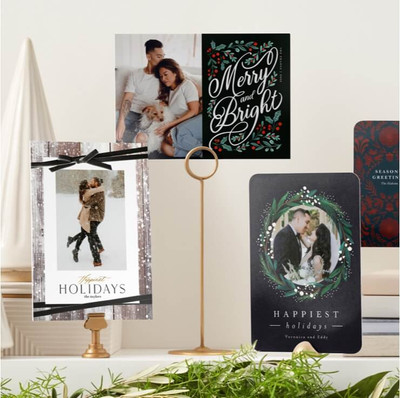
two christmas cards on a mantle

Should You Send a Christmas Card If Someone Sent You One?

Receiving an unexpected Christmas card doesn’t automatically create an obligation to send one in return.

That said, many people choose to reciprocate, especially if they expect to stay in touch with that person moving forward. Keeping a few extra cards on hand can make it easy to send a thoughtful greeting if a surprise card arrives in your mailbox.

Is It Okay to Send Christmas Cards After Christmas?

Yes.

Life gets busy during the holidays, and late cards are far more common than most people realize. If your cards won’t arrive until after Christmas, you can still send them with a warm holiday message or update your greeting to wish recipients a Happy New Year.

Most people are simply happy to hear from friends and family, regardless of the exact date the card arrives.

Should You Handwrite a Christmas Card Message?

A handwritten note isn’t required on a Christmas card, but it’s often appreciated.

Even a short personal message can make your card feel more meaningful. A sentence or two referencing a shared memory, expressing gratitude, or wishing someone well in the coming year can help your card stand out.

For larger mailing lists, it’s perfectly acceptable to use a printed greeting and add handwritten notes only to close friends and family.

christmas cards hanging on staircase

Is It Okay to Send Photo Christmas Cards?

Absolutely.

Photo Christmas cards have become one of the most popular holiday card styles because they allow recipients to see how your family has grown and changed throughout the year. Family portraits, candid moments, travel photos, pictures of children, and even pet photos are all common choices.

When selecting photos, choose images that feel authentic and appropriate for the audience receiving the card.

Should You Include a Family Update on Christmas Cards?

Family updates can be a wonderful addition to Christmas and holiday cards, especially when you’re sending cards to relatives or friends you don’t see often.

The best updates are brief, warm, and focused on meaningful moments from the year. Major milestones, new family members, travels, accomplishments, and life changes are all common topics.

Try to keep the tone conversational and avoid turning your update into a lengthy list of achievements. A short recap often feels more personal and enjoyable to read.

Can You Send Christmas Cards to Coworkers or Professional Contacts?

Yes, provided you keep the tone appropriate for the relationship.

Many people send holiday cards to coworkers, clients, mentors, and professional connections as a way to express appreciation and maintain relationships. For professional recipients, a simple holiday greeting or New Year’s wish is often the safest approach.

If you’re unsure whether a religious greeting is appropriate, a general holiday message is usually a good choice.

Christmas Card Etiquette Tips

A few simple guidelines can help make holiday card season easier:

Most etiquette questions have the same answer: people appreciate being remembered. A sincere holiday greeting matters far more than following every rule perfectly.

Wrapping Up on Christmas Card Etiquette

Holiday cards are about connection, not perfection. Whether you’re sending photo Christmas cards, sharing a family update, mailing cards to friends of different faiths, or sending greetings a little later than planned, the gesture itself is what matters most. By focusing on kindness, thoughtfulness, and authenticity, you can create holiday cards that are warmly received and remembered long after the season ends.


The post When to Send Christmas Cards & Etiquette 2026 appeared first on Ideas & Inspiration.


When to Send Christmas Cards & Etiquette 2026 was first posted on June 18, 2026 at 1:30 pm.
©2016 "". Use of this feed is for personal non-commercial use only. If you are not reading this article in your feed reader, then the site is guilty of copyright infringement. Please contact me at iops-dco@shutterfly.com
]]> https://www.shutterfly.com/ideas/when-to-send-out-christmas-cards/feed/ 0 How to Customize the Back of a Christmas Card https://www.shutterfly.com/ideas/how-to-customize-the-back-of-a-christmas-card/ Thu, 18 Jun 2026 20:12:15 +0000 https://www.shutterfly.com/ideas/?p=75216 Customize the back of your Christmas card with family updates, extra photos, holiday messages, and festive designs that make your greeting even more memorable.

The post How to Customize the Back of a Christmas Card appeared first on Ideas & Inspiration.


How to Customize the Back of a Christmas Card was first posted on June 18, 2026 at 1:12 pm.
©2016 "". Use of this feed is for personal non-commercial use only. If you are not reading this article in your feed reader, then the site is guilty of copyright infringement. Please contact me at iops-dco@shutterfly.com
]]>
When designing Christmas cards, most people focus on the front. But the back of your card offers even more space to share photos, tell your story, and add personal touches that make your holiday greeting memorable. Whether you want to include a family update, showcase extra photos, or add a heartfelt holiday message, customizing the back of your Christmas card can help create a keepsake friends and family will love receiving.

a man and woman looking at christmas cards

Why Customize the Back of Your Christmas Card?

The back of your Christmas card is valuable space that often goes unused. Instead of leaving it blank, you can use it to share favorite memories from the year, highlight milestones, add a holiday blessing, or simply include photos that didn’t fit on the front. A thoughtfully designed back helps your card feel complete while giving loved ones a deeper glimpse into your family’s year.

How to Customize the Back of Your Christmas Card

Personalizing the back of your Christmas card is easy.

Choose a Background

Start by selecting a background that complements your card design. From festive patterns and seasonal illustrations to simple textures and solid colors, the right background helps tie the front and back together.

Select a Layout

Choose a layout that complements the story you want to tell. Whether you’re highlighting a favorite family photo, sharing a year-in-review update, or creating a collage of memories, the right layout helps bring everything together.

Add Photos and Text

Upload additional photos, write a holiday message, share a family update, or include a meaningful quote. You can customize fonts, colors, and placement to create a design that feels uniquely yours.

Review and Order

Before placing your order, take one final look to make sure your photos, text, and layout appear exactly as intended. Then complete your order and prepare to spread holiday cheer.

christmas card with back of card text

Christmas Card Back Ideas

Looking for inspiration? These creative Christmas card back ideas can help you make the most of every inch of your design.

Share a Family Update

A year-in-review message is one of the most popular uses for the back of a Christmas card.

Example:

“What a year it’s been! Emma started kindergarten, Noah joined his first soccer team, and we welcomed our puppy, Charlie, to the family. We spent the summer exploring national parks and are looking forward to celebrating the holidays with loved ones. Wishing you a Merry Christmas and a wonderful New Year!”

Add a Favorite Family Photo

Choose one standout image that deserves its own spotlight. A cozy family portrait, vacation snapshot, or candid moment can make a beautiful full-photo card back.

Create a Photo Collage

Showcase multiple memories from throughout the year with a collage of family photos, travel highlights, celebrations, and everyday moments.

Spotlight the Kids or Pets

Dedicate the back of your card to the youngest members of the family—or your furry friends. Individual photos paired with names, ages, or fun captions add personality and charm.

Include a Holiday Greeting

Use the space to share a longer Christmas wish or seasonal message.

Example:

“May your holidays be filled with joy, your home be filled with laughter, and your New Year be filled with happiness and good health.”

Highlight a Major Milestone

Celebrate a wedding, engagement, new baby, graduation, retirement, new home, or another meaningful event from the year. Pair a favorite photo with a short description of the occasion.

Share Travel Memories

Feature photos from a memorable trip and give loved ones a glimpse of your adventures. A small collage works especially well for this idea.

Add a Meaningful Quote

A favorite Christmas quote, Bible verse, or seasonal saying can add warmth and inspiration to your card design.

Example:

“Christmas isn’t a season. It’s a feeling.”

Include a Fun, Candid Moment

Not every photo needs to be perfectly posed. A funny outtake, laughing family photo, or pet photobomb can make your card feel more personal and memorable.

Keep it Simple

Sometimes less is more. A festive background paired with a short sign-off can create an elegant finishing touch.

Example:

“With love, the Johnson Family”

Christmas Card Back Examples

Year-in-Review Card Back

  • One family photo
  • 100–150 word family update
  • Family signature

Photo Collage Card Back

  • Four to six photos from the year
  • Short holiday greeting
  • Family name and year

Kids & Pets Card Back

  • Individual photos of children or pets
  • Names and ages
  • Brief holiday message

Simple Message Card Back

  • Decorative background
  • Holiday quote or blessing
  • Family signature

Should You Include a Family Update?

Family updates can be a great addition to Christmas cards, especially when sending cards to long-distance friends and relatives. Keep updates brief and focus on a few meaningful highlights rather than listing every event from the year. A short, thoughtful message paired with photos often feels more personal and enjoyable to read.

Make the Back of Your Christmas Card as Special as the Front

The back of your Christmas card gives you extra space to share photos, family updates, holiday wishes, and special memories from the year. Whether you keep it simple with a favorite photo or create a collage filled with highlights, customizing both sides of your card helps create a holiday greeting that’s uniquely yours. Start designing your Christmas cards today and turn every detail into something worth sharing.

Additional Resources:

The post How to Customize the Back of a Christmas Card appeared first on Ideas & Inspiration.


How to Customize the Back of a Christmas Card was first posted on June 18, 2026 at 1:12 pm.
©2016 "". Use of this feed is for personal non-commercial use only. If you are not reading this article in your feed reader, then the site is guilty of copyright infringement. Please contact me at iops-dco@shutterfly.com
]]>
How to Make Christmas Cards https://www.shutterfly.com/ideas/how-to-make-christmas-cards-fast/ Wed, 17 Jun 2026 22:00:19 +0000 https://www.shutterfly.com/ideas/?p=73066 Make personalized Christmas cards with your favorite photos, holiday greetings, and custom details. Learn how to create Christmas cards with ease.

The post How to Make Christmas Cards appeared first on Ideas & Inspiration.


How to Make Christmas Cards was first posted on June 17, 2026 at 3:00 pm.
©2016 "". Use of this feed is for personal non-commercial use only. If you are not reading this article in your feed reader, then the site is guilty of copyright infringement. Please contact me at iops-dco@shutterfly.com
]]>
Christmas cards are one of the most personal ways to share holiday wishes with family and friends. Whether you want to showcase a favorite family photo, celebrate a milestone from the year, or simply send a festive greeting, creating custom Christmas cards is easier than ever. With the right photos, a design that fits your style, and a heartfelt message, you can create holiday cards that become keepsakes long after the season ends.

How to Make Christmas Cards in 5 Easy Steps

  1. Choose the photos you want to feature on your card.
  2. Select a Christmas card design that matches your style.
  3. Customize your layout, colors, fonts, and text.
  4. Add your holiday greeting and personal message.
  5. Review, order, and send your cards to family and friends.

two women holding christmas cards

Why Create Christmas Cards with Shutterfly?

Shutterfly makes it easy to turn your favorite photos into personalized Christmas cards. Choose from hundreds of holiday card designs, customize fonts, colors, and layouts, and add extra photos or family updates to the back of your card at no additional cost. Whether you prefer a classic photo card, a modern design, or a festive foil card, there are options for every style.

To make holiday mailing easier, Shutterfly also offers free recipient address printing and Mail for Me, which can address, stamp, and mail your cards directly to recipients for you.

Choose the Best Photos for Your Christmas Cards

The photos you choose set the tone for your Christmas card. A single family portrait can create a timeless look, while a collage design allows you to share highlights from the entire year. Consider photos that feel meaningful, whether that’s a professional family photoshoot, candid moments from everyday life, vacation memories, a new baby, or favorite pictures with your pets.

When selecting images, look for photos that are bright, clear, and high resolution. If you’re using multiple photos, choose images with similar lighting and colors to create a more cohesive design. Horizontal photos often work best for landscape card layouts, while vertical images are ideal for portrait-oriented designs.

two christmas cards on a mantle

Pick a Christmas Card Style

Your card design should reflect your personality and the story you want to tell. Traditional Christmas cards feature classic holiday colors, seasonal artwork, and elegant typography. Modern designs often use clean layouts, simple fonts, and minimal embellishments. Families looking for something playful may prefer colorful designs, multi-photo layouts, or cards with humorous messages.

Popular Christmas card styles include:

Customize Your Christmas Card Design

Once you’ve selected a design, personalize it with details that make it your own. Add family names, write a holiday greeting, and adjust fonts, colors, and layouts to match your preferences. You can also add extra photos, messages, or family updates to the back of your card design at no additional cost. Small design choices can make a big difference in creating a card that feels unique.

Many Christmas card designs also offer premium upgrades such as foil accents, decorative trim options, and premium cardstock. These finishing touches can elevate the overall look while keeping the focus on your photos and message.

Write a Meaningful Christmas Card Message

A thoughtful message helps make your Christmas card memorable. Some families prefer a simple greeting, while others include a short update about the past year. Whether your message is heartfelt, religious, humorous, or traditional, it should feel authentic to you.

Popular Christmas card messages include:

  • Wishing you a Merry Christmas and a Happy New Year.
  • Sending warm holiday wishes from our family to yours.
  • May your holiday season be filled with joy, peace, and happiness.
  • Merry Christmas and best wishes for the year ahead.

When to Order and Send Christmas Cards

Ordering your cards early gives you plenty of time to address, mail, and deliver them before the holiday rush. Many families begin creating their Christmas cards in October or November and mail them between late November and mid-December.

To save time, use Shutterfly’s free recipient address printing to have addresses printed directly on your envelopes. If you’d rather skip the mailing process altogether, Mail for Me can address, stamp, and mail your Christmas cards for you. Planning ahead helps ensure your cards arrive before the holiday rush.

2024 holiday and christmas cards

Christmas Card Ideas

Need inspiration for your holiday card? Consider highlighting a favorite memory, milestone, or tradition from the past year. Some popular Christmas card ideas include:

collection of christmas and holiday cards

Related Resources on Making Christmas Cards

Whether you’re creating a photo Christmas card, a traditional holiday greeting, or a festive collage of memories from the year, a personalized card is a meaningful way to stay connected during the holiday season. Explore the resources below for more Christmas card ideas, messages, and holiday inspiration.

Additional Resources:

The post How to Make Christmas Cards appeared first on Ideas & Inspiration.


How to Make Christmas Cards was first posted on June 17, 2026 at 3:00 pm.
©2016 "". Use of this feed is for personal non-commercial use only. If you are not reading this article in your feed reader, then the site is guilty of copyright infringement. Please contact me at iops-dco@shutterfly.com
]]>
How Many Photos Should Be in a Photo Book? https://www.shutterfly.com/ideas/how-many-photos-should-be-in-a-photo-book/ Wed, 20 May 2026 22:30:56 +0000 https://www.shutterfly.com/ideas/?p=75229 Learn how to choose the right number of photos for your Shutterfly photo book, with tips on planning layouts, selecting favorites, and creating a balanced design.

The post How Many Photos Should Be in a Photo Book? appeared first on Ideas & Inspiration.


How Many Photos Should Be in a Photo Book? was first posted on May 20, 2026 at 3:30 pm.
©2016 "". Use of this feed is for personal non-commercial use only. If you are not reading this article in your feed reader, then the site is guilty of copyright infringement. Please contact me at iops-dco@shutterfly.com
]]>
When creating a photo book, a good rule of thumb is to include around 1–4 photos per page, depending on your layout and storytelling style. For a 20-page photo book, that usually means between 40–80 photos. Large collections from weddings, vacations, and family albums can sometimes include hundreds of images, but AI-powered Autofill tools can help organize layouts faster and simplify the design process. A more minimal photo book design may only use a few photos per page, while collage-style layouts can comfortably fit 100+ photos for bigger events and memory-filled albums.

family in a year in review photo book

Consider the Purpose of Your Photo Book

The number of photos you include depends on what kind of story you’re telling.

  • For a milestone event like a wedding or graduation, include a mix of key moments and small details—about 3–4 photos per page.
  • For a baby or family yearbook, you might add more photos to capture everyday memories.
  • For a portfolio or travel book, fewer images per page can help each shot stand out.

Think about your book’s purpose before you start selecting photos so your layout feels balanced and intentional.

Choose the Right Photo Book Size

Shutterfly’s photo books come in a variety of sizes—from small 8×8 books to large 12×12 albums—each with 20 to 111 pages. While all sizes can hold a large number of photos, the size you choose affects how your images appear on the page.

  • Smaller books are perfect for concise stories or gifts, where 40–80 photos feel balanced.
  • Medium to large books allow more breathing room for your images or can comfortably feature 100–200+ photos with collage layouts.

No matter the size, adding extra pages gives you plenty of space to include every photo that matters most.

wedding album with pictures of family

Use Layouts and Collages to Fit More Photos

You don’t have to limit yourself to one photo per page. With Shutterfly’s pre-designed photo book templates and AI-powered Autofill, you can quickly arrange photos into creative collage layouts without manually building every page yourself. Autofill can create a starting layout in seconds using all, most, or your best photos, making large collections from weddings, vacations, or yearly family albums easier to organize.

Try mixing full-page images with collage spreads to keep the flow dynamic. This makes it easy to include a variety of moments—like group shots, close-ups, and candid photos—without overwhelming each page.

Curate, Don’t Cram

It can be tempting to include every picture from your camera roll, but less is often more. If you’re sorting through hundreds of photos, AI-powered tools can help simplify the process by making large photo collections easier to sort and arrange.

As you review your layout, focus on the photos that tell the story most clearly. Look for sharp images with good lighting, and avoid near-duplicates. A thoughtfully curated selection makes your photo book feel cohesive and meaningful from start to finish.

one closed and one open travel photo book

Related Resources on How Many Photos Should Be in a Photo Book

There’s no single “right” number of photos for a photo book—it’s all about your vision and the story you want to tell. Whether you include 40 or 140 photos, focus on highlighting your favorite memories in a design that feels personal to you. With Shutterfly’s flexible layouts and easy customization tools, you can create a book that’s as full—or as minimalist—as you want it to be.

Additional Resources:

The post How Many Photos Should Be in a Photo Book? appeared first on Ideas & Inspiration.


How Many Photos Should Be in a Photo Book? was first posted on May 20, 2026 at 3:30 pm.
©2016 "". Use of this feed is for personal non-commercial use only. If you are not reading this article in your feed reader, then the site is guilty of copyright infringement. Please contact me at iops-dco@shutterfly.com
]]>
What Makes Shutterfly Photo Quality Stand Out https://www.shutterfly.com/ideas/what-to-know-about-shutterflys-photo-print-quality/ Wed, 20 May 2026 16:29:19 +0000 https://www.shutterfly.com/ideas/?p=74643 Learn what affects photo print quality, how to avoid blurry prints, and how Shutterfly uses premium materials and printing technology to help your photos look their best.

The post What Makes Shutterfly Photo Quality Stand Out appeared first on Ideas & Inspiration.


What Makes Shutterfly Photo Quality Stand Out was first posted on May 20, 2026 at 9:29 am.
©2016 "". Use of this feed is for personal non-commercial use only. If you are not reading this article in your feed reader, then the site is guilty of copyright infringement. Please contact me at iops-dco@shutterfly.com
]]>
When you trust a company with your most meaningful photos, quality matters. Whether you’re printing everyday snapshots, creating framed wall art, or preserving memories in a photo book, you want your images to look sharp, vibrant, and true to life.

At Shutterfly, print quality is built into every step of the process. From premium materials and professional printing technology to AI-powered photo enhancements and quality checks, our goal is to help your photos look their best from screen to print.

If you’re wondering what affects photo print quality, why previews sometimes look blurry, or what makes a print look professional, this guide covers everything you need to know before printing your photos.

How Shutterfly Delivers High-Quality Photo Prints

At the core of our process is a dedication to consistent, professional-grade printing. We use HP Indigo digital presses, which are known for producing vibrant color, smooth gradients, and sharp detail. Combined with high-quality inks and premium materials, our printing technology helps every product — from standard photo prints to canvas prints, photo books, cards, and personalized gifts — look vivid and polished.

We’re not just printing your memories. We’re helping preserve them in a format you can display, share, and revisit for years to come.

different sizes of photo prints

Why Do My Photos Look Blurry in Shutterfly Preview?

One of the most common questions customers ask is why their photos may appear blurry during preview. In many cases, the final print quality is better than what you see on screen.

Digital previews are compressed so pages and products can load faster while you design. If you zoom in closely during preview, images may appear softer or slightly pixelated even when the original file is high quality. This is especially common in photo books, large wall art previews, and projects with multiple photos loading at once.

However, there are situations where blurry previews may indicate a low-resolution image. Screenshots, images downloaded from social media, photos sent through messaging apps, or heavily cropped photos often contain less detail than the original image file.

If a photo resolution is too low for your selected product size, Shutterfly will usually display a warning message during the creation process so you can make adjustments before ordering.

Will My Prints Actually Look Blurry?

Not necessarily. A blurry preview does not always mean your final print will look blurry.

Most professionally printed photos appear sharper in print than they do in on-screen previews because the final printed file uses the original uploaded image rather than the compressed preview version. Print products are also viewed differently than screens. Larger items like canvas prints and posters are typically viewed from farther away, so they can still look great even with lower resolution than smaller prints require.

The biggest factors that affect print sharpness are:

  • The resolution of your original image
  • How much the image has been cropped
  • The size you’re printing
  • Whether the image came from the original camera file or a compressed source

If your photo was taken on a modern smartphone and uploaded directly from your device or cloud storage, it will usually work well for standard print sizes like 4×6, 5×7, and 8×10.

How to Fix Blurry Photos Before Printing

If your image looks blurry during preview, there are several ways to improve print quality before placing your order.

Use Original Photo Files

Whenever possible, upload the original version of your image directly from your phone, camera, or cloud storage account. Screenshots and images downloaded from social media platforms are often compressed and may not print clearly.

Avoid Heavy Cropping

Cropping removes pixels from your image. The more you crop into a photo, the less detail remains for printing. If a photo needs significant cropping, choosing a smaller print size may produce better results.

Check the Crop Preview Carefully

Different print sizes use different aspect ratios, which can sometimes trim important areas of your photo. Reviewing the crop preview allows you to reposition the image and avoid unexpected cropping or stretching.

Use Higher-Resolution Photos for Large Prints

Larger wall art sizes require more image detail than smaller prints. Photos that work perfectly as a 4×6 may not look as sharp when enlarged to poster or panoramic sizes.

Try Auto-Enhance for Dark or Low-Light Images

Shutterfly’s built-in AI photo enhancement tools can help improve brightness, color, and clarity for photos taken indoors or in poor lighting conditions. You can preview the changes and turn enhancements on or off at any time.

Color Accuracy You Can Count On

Color is one of the biggest factors that affects how professional a photo print looks. Our printers automatically check color throughout production to help maintain consistency from print to print.

This helps preserve:

  • Natural skin tones
  • Balanced brightness and contrast
  • Accurate color reproduction
  • Rich detail in shadows and highlights

Whether you’re printing family portraits, vacation photos, wedding pictures, or everyday snapshots, consistent color helps your images look true to the original, every time.

Ink, Paper, and Finishes That Make a Difference

Shutterfly uses high-quality pigmented inks for long-lasting color and detail across a wide range of products and materials. We also partner with premium paper suppliers to create prints with rich color, clarity, and durability.

You can choose from multiple finishes depending on how you plan to display your photos.

Glossy Prints

Glossy finishes create vibrant color and sharp detail with a reflective surface that makes images appear bold and vivid.

Matte Prints

Matte finishes offer a softer, non-reflective look that helps reduce glare and fingerprints, making them popular for framed photos and everyday handling.

Cardstock Prints

Cardstock prints use thicker material with a more substantial feel, making them ideal for cards, keepsakes, and display photos.

hand holding 4x6 photo print

What Resolution Do My Photos Need?

One of the most common questions customers ask is how large they can print a photo while still maintaining good quality.

As a general guideline:

  • 300 PPI (pixels per inch) is ideal for photo prints, cards, and photo books.
  • Larger decor items like photo blankets or canvas prints can often use slightly lower resolution because they are viewed from farther away

Here are a few recommended resolutions for popular print sizes:

  • 4×6: 1200 × 1800
  • 5×7: 1500 × 2100
  • 8×10: 2400 × 3000
  • 16×20: 4800 × 6000

Most photos taken on modern smartphones already meet the resolution requirements for standard print sizes.

photo blanket mug and photo book

What Makes a Photo Print Look Professional?

Professional-quality photo prints depend on several elements working together, including:

  • High-resolution source images
  • Sharp detail and clarity
  • Accurate color reproduction
  • Premium paper and materials
  • Durable printing processes designed to resist fading over time

When these factors come together, the result is a print that looks polished, vibrant, and display-worthy.

Built-In Quality Control at Every Step

Our dedicated quality control team monitors print output across our production network using real-time quality dashboards that track color, clarity, and consistency.

Each product must meet Shutterfly’s internal quality standards before it ships. This ongoing monitoring helps maintain consistent quality across photo prints, photo books, wall art, cards, calendars, and personalized gifts.

photo prints of child

Printing Expertise You Can Trust

Shutterfly is a member of Printing United and employs IDEAlliance-certified color experts to help maintain professional printing standards. Our HP Indigo fleet is one of the largest in the world, and we’ve partnered directly with HP to help develop printing innovations like Color Beat technology for even greater color consistency.

What started as a single photo lab has grown into a platform that helps millions of customers create personalized photo products each year while maintaining a strong focus on print quality and customer experience.

The Difference Between Shutterfly and Pro Labs

Professional photo labs are often designed for photographers who want highly customized workflows, color profiles, and editing control. Shutterfly focuses on making high-quality photo printing more accessible and convenient for everyday customers.

That means you can create professional-looking photo products without needing advanced design software or photography expertise. With built-in editing tools, AI enhancements, premium materials, and a wide variety of print products, Shutterfly combines quality printing technology with an easy-to-use experience.

Related Resources on Shutterfly Photo Print Quality

Whether you’re printing everyday snapshots, enlarging a favorite family photo, or creating personalized wall art, high-quality printing helps your memories look their best for years to come.

By using premium materials, professional printing technology, AI-powered enhancements, and built-in quality checks, Shutterfly makes it easier to create photo products that look sharp, vibrant, and ready to display.

Additional Resources:

The post What Makes Shutterfly Photo Quality Stand Out appeared first on Ideas & Inspiration.


What Makes Shutterfly Photo Quality Stand Out was first posted on May 20, 2026 at 9:29 am.
©2016 "". Use of this feed is for personal non-commercial use only. If you are not reading this article in your feed reader, then the site is guilty of copyright infringement. Please contact me at iops-dco@shutterfly.com
]]>
How to Customize Wedding Invitations https://www.shutterfly.com/ideas/how-to-customize-wedding-invitations/ Wed, 29 Apr 2026 21:14:45 +0000 https://www.shutterfly.com/ideas/?p=76359 Customize your wedding invitations with Shutterfly. Explore paper, trim, foil, colors, and more to create polished, personalized invitations.

The post How to Customize Wedding Invitations appeared first on Ideas & Inspiration.


How to Customize Wedding Invitations was first posted on April 29, 2026 at 2:14 pm.
©2016 "". Use of this feed is for personal non-commercial use only. If you are not reading this article in your feed reader, then the site is guilty of copyright infringement. Please contact me at iops-dco@shutterfly.com
]]>
Your wedding invitations should feel personal, polished, and worth holding onto. With Shutterfly, you can customize your wedding invitations in more ways than just choosing a design. You can add your wording, explore different fonts, adjust colors, choose paper that fits the feel of your day, and finish everything with details like trim shapes, foil accents, envelope liners, and matching suite pieces.

These customization options make it easy to elevate your wedding invitations without starting from scratch. A simple change like thicker paper, metallic foil, a shaped trim, or a custom envelope can make the whole set feel more special when it arrives in your guests’ hands.

Below, you’ll find the main ways to customize wedding invitations with Shutterfly, along with tips for using each option to create invitations that feel beautifully made and true to your wedding.

Design Templates

flat lay of different wedding invitations

Your design is what sets the tone for your wedding invitation. While you can customize details later, the structure and overall style come from the template you choose, so it’s worth spending time here upfront.

Shutterfly offers a range of styles, from modern and minimalist to floral, rustic, and more formal designs. Each template is built with a specific layout, which controls how your names, date, and details are arranged on the card.

  • Photo and non-photo layouts
  • Styles like modern, floral, minimalist, rustic, and formal
  • Pre-designed layouts that guide how your information flows
  • Upload your own design option that lets you use your own artwork or layout for a fully personalized invitation

Paper Types and Finishes

wedding invitation in different cardstock paper types

Paper is one of the most important customization choices because it changes how your wedding invitation is experienced the moment it’s picked up.

The right choice usually comes down to how formal your wedding is and how much you want the invitation to stand on its own versus letting the design do the work. Heavier paper naturally feels more elevated, while lighter options keep things practical. Finish matters just as much. Matte keeps everything clean and easy to read, while a slight sheen can add dimension when the design is more minimal.

If your invitation includes a lot of text or fine details, a smoother matte surface will keep everything crisp. For designs that are more minimal, the paper itself plays a bigger role in how the invitation comes across.

  • Standard Smooth Cardstock: Lightweight matte paper with a clean, simple finish; a practical option for more casual or budget-conscious invitations
  • Signature Smooth Cardstock: Thicker matte paper with a more noticeable weight; a balanced option that works across most styles
  • Pearl Shimmer Cardstock: Smooth paper with a soft, light-reflective finish that adds subtle dimension
  • Luxe Double-Thick Cardstock: Extra-thick matte paper with a substantial feel; often used for more formal or keepsake-style invitations
  • 100% Recycled Cardstock: Sturdy, smooth paper made from post-consumer materials with a polished look

Learn more: Wedding Invitation Paper Types & Finishes Explained

Trim Shapes

Trim shapes change the silhouette of your invitation. It’s a small customization choice, but it can make the card look more tailored, especially when the edge shape matches the style of the design. Clean edges tend to feel timeless and formal, while shaped edges can add softness, movement, or a more decorative finish.

The main thing to watch is balance. If your invitation already has ornate florals, detailed borders, or a lot of typography, a simpler trim can keep it from feeling too busy. If the design is minimal, a shaped trim can give it a more polished look without changing the design itself.

  • Square: Clean, straight edges that create a classic and polished look; works with any design style.
  • Rounded: Soft, curved edges that make the invitation feel slightly more relaxed and approachable.
  • Bracket: Curved inward corners that add a subtle decorative detail without overwhelming the layout.
  • Scallop: Rounded, wave-like edges that create a more decorative and romantic feel.
  • Ticket: Notched corners that add a unique, structured detail with a slightly modern edge.

Foil Accents

dark blue floral wedding invitation

Foil is a customization option that gives your invitations a more high-end finish. The metallic detail catches the light and naturally draws attention to the most important parts of your design.

You’ll find foil used in wedding invitation designs to highlight names, your wedding date, or small decorative details on the card. That contrast between the foil and the rest of the print is what makes those elements stand out right away when your guests see it in person.

  • Gold foil: Warm metallic finish that highlights key details with a traditional, elegant look.
  • Rose gold foil: Softer metallic tone that pairs well with romantic or modern color palettes.
  • Iridescent foil: Light-reflective finish that shifts subtly depending on the angle; adds a more modern detail.

Text and Fonts

wedding invitations flatlay

This is where you put in your actual details and decide how they show up on the wedding invitation. The wording itself matters, but so does how it’s styled and spaced.

You have flexibility to adjust fonts, update colors, and move text so everything fits cleanly and reads the way you want it to.

  • Custom wording: Add your names, date, time, location, RSVP details, and wedding website
  • Font options: Choose from a wide range of fonts and apply them across your invitation to style your names, headings, and details
  • Text placement: Move text boxes to fit your wording and adjust spacing as needed
  • Text emphasis: Make sure your names and wedding date stand out first

What makes the biggest difference here is how everything reads together. Your names and date should be easy to spot right away, with the rest of the details following naturally. Once it’s set up, a quick read-through is usually all it takes to make sure it feels right.

Colors

Color is one of the simplest ways to make your invitation feel tied to your wedding. Once you’ve chosen a design, adjusting the colors is what helps everything feel cohesive instead of generic.

You can update text colors to match your palette or make certain details stand out more clearly. Many designs also allow you to adjust parts of the artwork itself, while others offer preset color versions that have already been designed to work well together. The goal is to make sure your colors feel intentional and easy to read, especially for your names and wedding date.

  • Text color changes: Update the color of your names, headings, and key details
  • Design color adjustments: Change colors within the design where options are available
  • Preset color options: Choose from built-in color combinations on select templates

Photos

wedding invitations and envelopes

Photos are one of the most personal ways to customize your invitation. They give you the chance to bring your story into the design, whether that’s a favorite engagement photo or a few moments you want to share with your guests.

Some invitations are built around a single image, keeping the focus on one standout photo. Others are designed to hold multiple images, which can feel more like a collection of moments and give the invitation a more personal feel.

  • Single-photo layouts: Feature one main image that becomes the focal point of the invitation
  • Multi-photo layouts: Include multiple images, often on larger or folded designs with more space
  • Photo placement: Arrange images within the template so they work naturally with your text

Back-of-Card Designs

flat lay of wedding invitation and back of card design

The back of your invitation gives you more room to work with, which is something a lot of couples don’t realize at first. It’s an easy way to include additional details or photos without having to fit everything onto the front.

Shutterfly includes free back-of-card designs, so you can add more without needing an extra insert. You can use it to expand on your invitation, whether that’s adding more information for guests or incorporating extra photos that didn’t make it onto the main design.

  • Additional text: Add details like accommodations, dress code, or extra event information
  • Photo additions: Include extra images or a collage on the back
  • Alternate layouts: Choose from different back-of-card designs to coordinate with your front

Envelope Designs and Liners

wedding invitation with floral envelope liner

Your envelope is the first thing your guests see, so it sets the tone before the invitation is even opened. It’s also one of the easiest places to add a more finished, pulled-together look without changing anything else.

You have a few different ways to customize your envelopes depending on how simple or detailed you want them to feel.

  • Plain white envelopes: A classic, straightforward option that works with any invitation
  • Custom envelopes: Designed to match your invitation with coordinated colors, patterns, or artwork
  • Colored envelopes: Solid color options that add a bit more personality from the start
  • Pre-lined foil envelopes: White envelopes with a metallic foil lining for a more elevated finish
  • Slip-in liners: Separate liners in color or pattern that add detail when the envelope is opened

Free printed addressing is also included with custom and pre-lined envelopes, so your return and recipient addresses are taken care of for you. It’s a small detail that makes the whole set feel more complete and saves time when you’re getting everything ready to send.

Matching Invitation Suites

deep purple wedding invitation suite

Your wedding invitation is just one part of the full set your guests receive. Adding matching pieces keeps everything consistent from the first envelope to the final thank you, without needing to start from scratch each time.

Incorporating more pieces into your wedding invitation suite also gives you more room to share information in a way that feels organized instead of crowded. Instead of trying to fit everything onto one card, you can break it out across pieces that are designed to go together.

  • RSVP cards: Let guests respond with a card that matches your invitation
  • Details cards: Include accommodations, directions, weekend events, or anything else guests need to know
  • Wedding thank you cards: Carry the same design through after your wedding

Customize Your Wedding Invitations with Confidence

The details you choose are what make your wedding invitations feel like yours. From the paper and trim to foil, photos, and envelope finishes, each decision shapes how your invitation looks, feels, and reads when your guests receive it.

Those choices are what turn a design into something specific to your wedding. When everything comes together, your invitation does more than share information. It sets the tone, gives a clear first impression, and feels like a true introduction to your day.

Additional Resources:

The post How to Customize Wedding Invitations appeared first on Ideas & Inspiration.


How to Customize Wedding Invitations was first posted on April 29, 2026 at 2:14 pm.
©2016 "". Use of this feed is for personal non-commercial use only. If you are not reading this article in your feed reader, then the site is guilty of copyright infringement. Please contact me at iops-dco@shutterfly.com
]]>
How to Get the Best Shutterfly Photo Book Deals https://www.shutterfly.com/ideas/how-to-get-the-best-shutterfly-photo-book-deals/ https://www.shutterfly.com/ideas/how-to-get-the-best-shutterfly-photo-book-deals/#respond Wed, 22 Apr 2026 16:00:00 +0000 https://www.shutterfly.com/ideas/?p=60754 Find the best photo book deals to help you save big when designing personalized albums filled with your memories with Shutterfly.

The post How to Get the Best Shutterfly Photo Book Deals appeared first on Ideas & Inspiration.


How to Get the Best Shutterfly Photo Book Deals was first posted on April 22, 2026 at 9:00 am.
©2016 "". Use of this feed is for personal non-commercial use only. If you are not reading this article in your feed reader, then the site is guilty of copyright infringement. Please contact me at iops-dco@shutterfly.com
]]>
Photo books are one of the best ways to preserve your favorite memories, and you don’t have to pay full price to create one. Shutterfly regularly offers promo codes, free page deals, and seasonal discounts that make it easy to design a high-quality photo book for less. This guide breaks down the best ways to find and use those deals so you can save without compromising on quality.