


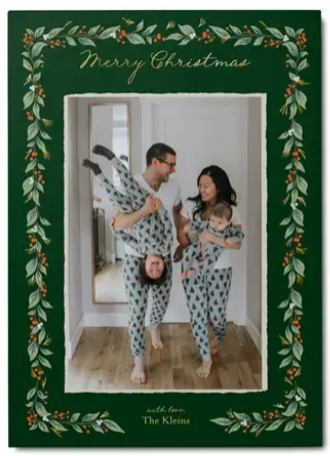


It’s exciting to see your Christmas cards come together in the editor, so it can be surprising if they don’t look exactly the same once they’re printed. In most cases, the differences come down to the natural differences between viewing a design on a bright digital screen and holding a printed card in your hands.
Below are some of the most common reasons your Christmas cards may look different than the preview, along with tips to help you get the best possible results.

Printed Colors May Look Different Than Your Screen
Your phone, tablet, and computer display colors using light, while printed cards use ink on paper. Because of this, printed colors may appear slightly different than what you see on your screen.
Several factors can affect how your design appears before printing, including:
- Screen brightness
- Display settings
- True Tone or Night Shift on mobile devices
- Different monitor color calibration
For the most accurate preview, view your design with your screen brightness set to about 50% and disable any color-altering display settings while reviewing your cards.
Photos May Print Darker Than They Look on Your Phone
One of the most common surprises is that printed photos can appear slightly darker than they did on a phone or computer screen. Digital screens are backlit, making photos appear brighter and more vibrant than they will in print.
Before uploading your photos, consider:
- Slightly increasing brightness if your images already look dark
- Avoiding heavy filters that reduce detail in shadows
- Using the original, full-resolution photo whenever possible
Well-lit photos with natural lighting typically produce the best printed results.
Paper Type Can Change the Overall Look
Different paper types have their own appearance and feel, which can affect how your Christmas cards look.
For example, paper with a smooth finish may display colors differently than paper with a subtle shimmer or extra thickness. If you’re choosing between paper options, consider the overall style you’re trying to create, whether that’s classic, elegant, modern, or luxurious.
Slight Cropping Can Occur During Printing

If your card design includes photos that extend all the way to the edge, a small amount of trimming is normal during production. This helps ensure there are no white edges on the finished card.
To avoid important details being trimmed:
- Keep faces and important elements away from the edges
- Review your design carefully before ordering
- Reposition photos in the editor if needed
Foil and Specialty Finishes Look Different in Person

If you selected a foil Christmas card, the preview is designed to show where the foil will appear, but it can’t fully recreate how real foil reflects light.
Gold, silver, rose gold, red, and iridescent foil all change in appearance depending on the viewing angle and lighting. This reflective quality is part of what gives foil cards their premium look.
Every Screen Looks a Little Different
The same Christmas card can look slightly different on two different devices. A design viewed on a phone may appear warmer or more saturated than it does on a laptop or desktop monitor.
That’s completely normal and is one reason professionally printed cards may not match every digital display exactly.
How to Get the Best Results
A few simple steps can help your finished Christmas cards look their best:
- Use original, high-resolution photos instead of screenshots or images downloaded from social media
- Choose bright, well-lit photos whenever possible
- Review your design on a screen with moderate brightness
- Double-check that important details aren’t too close to the edges
- Select the paper type that best matches the style you’re creating
- Preview every photo before placing your order
Create Christmas Cards You’ll Love
Creating custom Christmas cards should be an enjoyable part of the holiday season, and understanding how printed products differ from digital previews can help you order with confidence. By starting with high-quality photos, reviewing your design carefully, and choosing the paper and finishes that best fit your style, you’ll be well on your way to creating Christmas cards you’ll be excited to send. When you’re ready, explore Shutterfly’s collection of custom Christmas card designs to find one that brings your holiday memories to life.
Additional Resources:
- Why Christmas Card Photos Look Blurry and How to Avoid It
- How to Make Christmas Cards
- Top Holiday & Christmas Card Trends 2026
- 10 Reasons to Send Holiday Cards
- 10 Christmas Card Mistakes to Avoid Before You Order
- Christmas Card FAQs
- Why Choose Shutterfly for Christmas Cards
- Who to Send Christmas Cards To
- When to Send Christmas Cards
- Merry Christmas Wishes for Cards
