


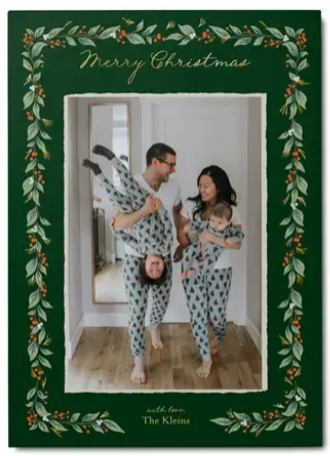


The best holiday cards start with a photo you’ll be excited to share. Whether you’re snapping a family portrait, capturing candid moments with the kids, or including your pets in the fun, a little planning can make a big difference. From choosing the right location and lighting to understanding how photos fit on card designs, these holiday card photo tips will help you create a picture-perfect card from start to finish.
Before You Start: Choose Your Holiday Card Photo Style

Before picking outfits or scouting locations, think about the overall look you want for your holiday card.
Some families love a traditional portrait with everyone looking at the camera. Others prefer a more relaxed approach that captures genuine interactions and everyday moments. You might want a festive photo featuring holiday decor, a playful shot with pets, or a collage that showcases highlights from the year.
If you’re looking for inspiration before planning your session, browse our Christmas card photo ideas for creative themes, poses, and seasonal settings.
Plan Your Holiday Card Photos Early
One of the most important Christmas card photo tips is to start sooner than you think you need to.
Give Yourself Time for Retakes
Aim to take your photos several weeks before you plan to order your cards. This gives you time to review your images, schedule a second session if needed, choose a card design, and address your cards before the holiday rush.
The first attempt isn’t always the best one, especially when young children or pets are involved. Building extra time into your schedule makes the process much less stressful.
Choose Outfits That Photograph Well
Coordinating outfits can help your photos look polished without feeling overly matched.
Choose colors that complement each other instead of dressing everyone in identical outfits. Neutral tones, rich jewel colors, earth tones, and soft seasonal shades tend to photograph beautifully.
Try to avoid:
- Large logos
- Neon colors
- Heavy graphics
- Busy patterns
- Strongly clashing colors
Need help choosing colors? Explore our guide to the best colors for family photos.
Pick the Right Location
The best location is often one that reflects your family’s personality.
Popular holiday card photo locations include:
- Local parks and nature trails
- Tree farms
- Downtown streets decorated for the season
- Cozy living rooms
- Front porches
- Beaches and outdoor destinations for warmer climates
Look for simple backgrounds that don’t compete with your subjects. A beautiful location should support the photo, not distract from it.
Use Lighting That Flatters Everyone

Lighting can have a bigger impact on your photos than the camera you use.
Why Golden Hour Is Ideal for Outdoor Photos
Golden hour is the period shortly after sunrise or before sunset when sunlight is softer and more flattering.
This light creates warm skin tones, minimizes harsh shadows, and helps photos feel inviting and natural. If possible, schedule outdoor sessions during these times instead of midday.
How to Use Window Light Indoors
Natural window light can create beautiful indoor portraits.
Position family members facing a large window rather than standing with the window behind them. This helps illuminate faces evenly and creates a bright, airy appearance.
If a room feels dark, move closer to the window instead of relying on overhead lighting.
Why Overcast Days Can Be Perfect
Cloudy weather is often a hidden advantage for family photography.
Overcast skies act like a giant diffuser, spreading light evenly across faces and reducing harsh shadows. Don’t be afraid to keep your photo plans if the forecast isn’t perfectly sunny.
When Flash Hurts More Than It Helps
Built-in phone and camera flashes can create harsh lighting, red eyes, and strong shadows.
Whenever possible, use natural light instead. If additional light is needed, try moving closer to windows or selecting a brighter location.
Camera and Phone Tips for Sharper Holiday Card Photos
You don’t need professional equipment to capture beautiful holiday card photos.
Best Phone Camera Settings for Families, Kids, and Pets
Modern smartphones have powerful photography features that can significantly improve your results.
Try using:
- Portrait mode for softly blurred backgrounds
- Burst mode for active children and pets
- Exposure adjustment to brighten faces
- Live Photos to capture multiple moments from a single shot
Before taking your photo, tap on your subject to lock focus and adjust exposure if faces appear too dark or bright. Taking several versions of the same shot from slightly different distances and angles can give you more flexibility when choosing a photo for your holiday card later.
Take more photos than you think you’ll need. Small differences in expressions often determine which image becomes your favorite.
DSLR Basics for Family Photos
If you’re using a DSLR or mirrorless camera, focus on simplicity.
A moderately wide aperture can help keep family members sharp while creating gentle background blur. Make sure everyone is positioned close to the same distance from the camera to keep faces in focus.
Should You Use a Tripod?
A tripod is one of the easiest ways to improve family photos.
Using a tripod allows you to:
- Include everyone in the photo
- Maintain consistent framing
- Eliminate camera shake
- Capture multiple versions of the same setup
Pairing a tripod with a self-timer or remote shutter makes it easy to photograph the entire family without asking a stranger to help.
Holiday Card Posing Ideas That Feel Natural

The best holiday card photos rarely look forced.
Large Family Photos
When photographing larger groups, stagger heights naturally by mixing standing and seated positions.
Avoid arranging everyone in a perfectly straight line. Small variations in height and spacing often create a more balanced and natural-looking image.
Couples and Small Families
Rather than focusing entirely on the camera, try interacting with each other.
Walking together, talking, laughing, or holding hands often produces photos that feel genuine and relaxed.
Including Pets
Pets can make holiday cards even more memorable.
Bring treats, favorite toys, and a helper if possible. Often the best pet photos happen during brief moments when animals are engaged but not overly excited.
Photographing Young Children
Children don’t always cooperate with carefully planned poses.
Instead of trying to control every moment, allow time for play and movement. Genuine smiles, laughter, and curiosity often create the strongest holiday card photos.
What Makes a Great Holiday Card Photo

A great photo for social media isn’t always the same as a great photo for printing on a holiday card.
Horizontal vs. Vertical Photos
Before choosing a photo, consider the card format you want to use.
Horizontal images typically work best with landscape card designs, while vertical images are often ideal for portrait layouts. Matching the orientation of your photo to the design can help minimize cropping.
Leave Space for Text
Many holiday card designs include room for names, greetings, or custom messages. When taking photos, avoid placing faces and important details too close to the edges of the frame so you have flexibility when adding text later.
Make Sure Your Photo Has Enough Resolution
High-resolution images typically produce the best print results.
Original images from your phone or camera usually work better than screenshots, heavily compressed files, or images downloaded from social media.
Understand How Card Cropping Works
Card layouts sometimes require photos to be cropped to fit specific design shapes and dimensions.
When taking photos, leave a little extra space around faces, pets, and important details. This gives you more flexibility when selecting a card design and adjusting your image.
Don’t Have a Perfect Photo? You Still Have Options
Not every holiday card needs a flawless portrait. Sometimes a few thoughtful design choices can help you make the most of a photo you already love.
Choose a Layout That Fits Your Photo
Use Multiple Photos Instead of One
If you have several strong photos but no clear favorite, consider a collage card. Combining multiple images lets you showcase different moments from throughout the year and takes the pressure off finding one perfect shot. It can also help tell a fuller story of your family, travels, celebrations, and milestones.
Your Favorite Photo Doesn’t Have to Be Perfect
Sometimes the photo you love most has a small distraction in the background, doesn’t leave quite enough space around the subject, or isn’t framed exactly the way you envisioned. Before giving up on a meaningful photo, explore your design and editing options.
Shutterfly’s editing tools, including AI-powered photo enhancements, can help address small issues without requiring you to start over with a different image. Whether you need to remove a distraction, create more space around a subject, or make adjustments to fit your chosen layout, a small imperfection doesn’t have to keep your favorite memory from becoming your holiday card.
Let Your Card Design Support Your Photo
A thoughtful card design can help highlight your favorite image, provide space for greetings and names, and create a polished finished look. Instead of forcing a photo to fit a specific layout, look for a design that complements the photo you already love. Sometimes a simple design that lets the image shine is more effective than a heavily decorated layout.
FAQs
What makes a good holiday card photo?
A good holiday card photo is well lit, in focus, high resolution, and leaves enough space for any design elements or messaging that may appear on the card.
When should I take my holiday card photos?
It’s best to take holiday card photos several weeks before you plan to mail your cards so you have time for editing, retakes, ordering, and addressing.
What should we wear for holiday card photos?
Choose coordinating colors rather than matching outfits. Neutral tones, jewel colors, and seasonal shades tend to photograph well.
How do I take a holiday card photo with my phone?
Use natural light whenever possible and take advantage of features like Portrait Mode, Burst Mode, and exposure adjustments to improve image quality.
What size photo do I need for a holiday card?
Use the highest-resolution version of your photo available. Original photos from your phone or camera typically provide the best print quality.
Can I use a portrait photo on a landscape holiday card?
Yes, but some cropping may be required depending on the card design. Choosing a layout that matches your photo orientation helps preserve more of the image.
Why does my holiday card crop my photo?
Cropping usually occurs when your photo dimensions do not match the photo space within the card design. Adjusting placement or selecting a different layout can often help.
What resolution should my holiday card photo be?
High-resolution photos generally produce the sharpest printed results. Original files from your phone or camera are usually the best option for printing.
Create a Holiday Card You’ll Love Sending
A little planning can go a long way when it comes to holiday card photos. Whether you’re capturing a family portrait, a candid moment with the kids, or a favorite memory from the year, the right photo can help your holiday cards feel more personal and memorable. Once you’ve found an image you love, choose a design that complements your photo and start sharing your holiday greetings with family and friends.
Additional Resources:
- Christmas Card Trends for 2026
- Make a Christmas Card With AI That Still Feels Personal
- How to Make Christmas Cards Look Professional
- Why Do Christmas Cards Look Different Than the Preview?
- Why Christmas Card Photos Look Blurry and How to Avoid It
- How to Make Christmas Cards
- Christmas Card FAQs
- Who to Send Christmas Cards To
- When to Send Christmas Cards
- Merry Christmas Wishes for Cards
- How to Choose the Best Photos for Christmas Cards
